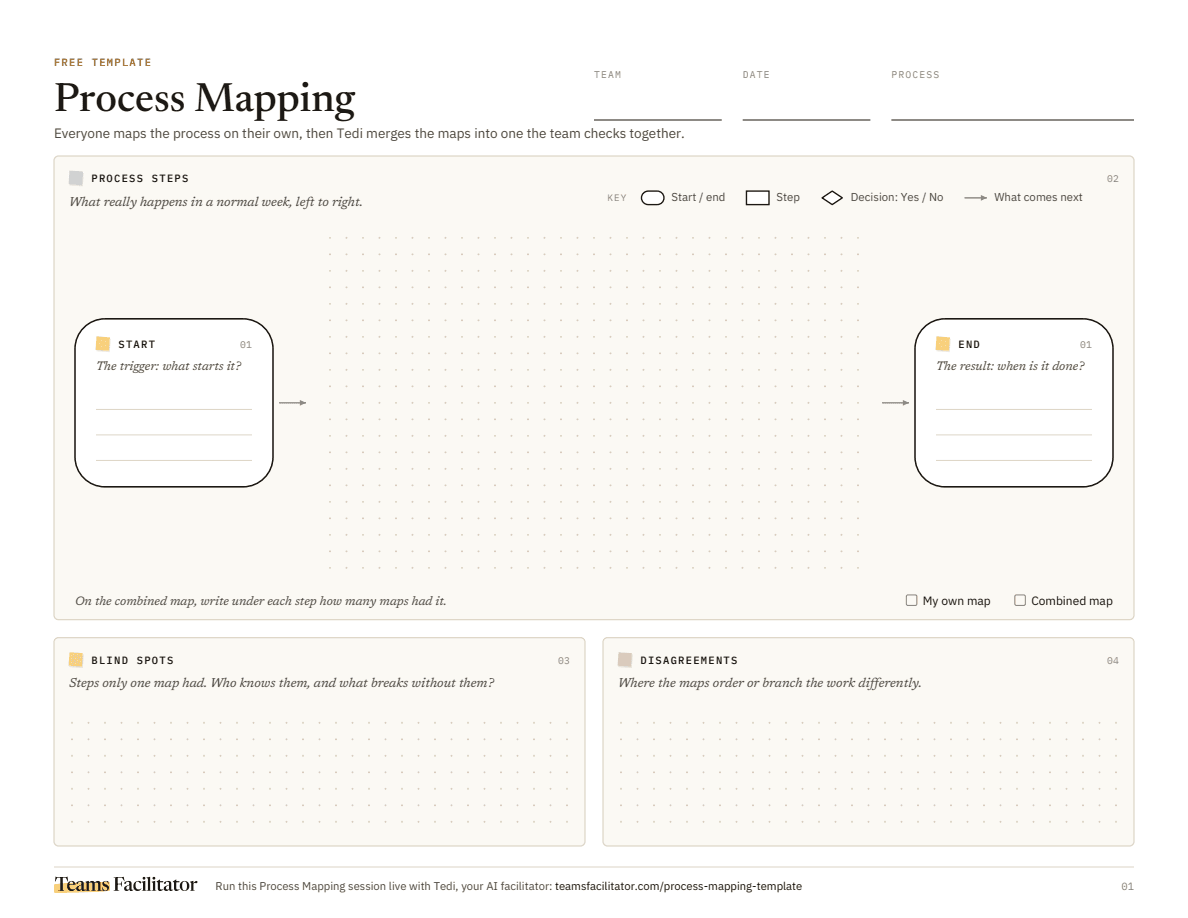
What is process mapping?
A process map shows how a piece of work gets from the trigger that starts it to the result that ends it: each step in order, the decisions that split the path, and where work waits or loops back. Most maps are drawn in one meeting by whoever holds the pen, so they show the process as the handbook describes it. This template has everyone map the process on their own first, then combines the maps into one. The steps only one person knew about and the places where people order the work differently are often the most useful things on the page.
- Best for
- Teams who share a process but each see only part of it
- Time
- 45–60 mins
- Who joins
- 3 to 10 people who do the work, not only the ones who manage it
- You leave with
- One agreed process map, with blind spots and disagreements flagged.
When to use process mapping
Use it when a handoff keeps going wrong, when work takes longer than anyone can explain, before you automate or change a process, when you onboard someone into work nobody has written down, or when two teams blame each other for delays. It works for any process that repeats and has a clear start and end: orders, refunds, hiring, the month-end close, a support ticket.
How to run process mapping
Agree the process first: one trigger that starts it and one result that ends it, both things you could see happen. Then give everyone ten to fifteen minutes to map it on their own, left to right: one step per box in a few words, a diamond for each decision with a Yes and a No path, and arrows for what comes next, rework loops included. Combine the maps into one and note how many maps had each step. Walk the main path together first, then take each step only one person mapped and each place where the maps disagree, and decide what really happens. Finish by marking where work waits longest and giving each fix an owner.
Questions to ask in each section
01Start and end
- What's the very first thing that kicks this process off?
- When is it truly finished, and how would you know?
02Process steps
- What really happens next in a normal week, not what the handbook says?
- Who does this step, and what do they need before they can start?
- Where does the path split, and what decides which way it goes?
03Blind spots
- Only one map has this step. Who knows it, and what would go wrong if it didn't happen?
- Is this work the rest of the team never sees, or does it only happen sometimes?
04Disagreements
- Does the order depend on the case, or do people simply do it differently?
- Should this be a decision, with a different path for each case?
Worked examples
Handling a refund request
A five-person support and finance team at a software startup, after refunds started taking two weeks.
- Customer asks for a refund
- Money back in their account
- Log the request in the help desk
- Find the payment
- Over $100? → Yes: finance approves / No: support approves
- Issue the refund
- Email the customer
- Ask why they're leaving (only 1 of 5 maps)
- Cancel the next renewal (only 1 of 5 maps)
- 2 maps approve before finding the payment, 3 after
Common mistakes
- Mapping the process the way the handbook says it runs, instead of what happens in a normal week.
- Drawing the map together from the start, so the loudest or most senior person sets the picture.
- Leaving the start and end vague (“Sales”, “Customer happy”), so everyone maps a different process.
- Packing several steps into one box, like “Process the order”.
- Deleting the steps only one person mapped as mistakes, when they're often the work nobody else sees.
- Picking one version where the maps disagree without asking why, when the process may really run differently case by case.
- Ending with a neat map and no owner for the fixes it showed.
Let Tedi run your process mapping session
On paper, someone has to collect everyone's map, copy the steps onto one wall and count who had what, and by then the meeting is over. In the session everyone maps on a private board that only they can see. When they're done, Tedi merges the maps into one on the shared board, shows how many maps had each step, and flags the steps only one person mapped and the places where the maps disagree. Then Tedi walks the team through the map until everyone agrees on it, and the summary lists the blind spots, the disagreements and the next steps with owners.
- One shared canvasEveryone adds notes at the same time, in the room or remote.
- A facilitator in the roomTedi keeps each section moving and draws in the quiet voices.
- A written outcomeDecisions, owners and next steps, captured before anyone leaves.
Process mapping FAQ
What is process mapping?
A way to draw how a piece of work really flows, from the trigger that starts it to the result that ends it: each step in order, the decisions that split the path, and where work waits or loops back.
Which symbols does a process map use?
Only a few: a rounded box for the start and the end, a rectangle for each step, a diamond for each decision with one arrow per answer, and arrows for what comes next. This template sticks to those four, so anyone can read it.
Why does everyone map on their own first?
Because the first person to draw sets the picture, and everyone else adjusts to it. Mapping alone first captures what each person really sees, and the differences between the maps show the blind spots and disagreements a group drawing hides.
Can the others see who mapped what?
No. Everyone's map stays private until the maps are combined, and the combined map only shows how many maps had each step, never whose they were.
How long does it take?
About 45 to 60 minutes: a few minutes to agree where the process starts and ends, a timed round to map it on your own, then the walk-through of the combined map.
Can we run it alongside Microsoft Teams or Zoom?
Yes. Teams Facilitator has video built in, but you can keep your call in Microsoft Teams, Zoom or Google Meet and run the session in a browser tab alongside it. Everyone maps on their own laptop, and guests join with just their name.
What do we get at the end?
One agreed process map, the steps only some of you knew about, the disagreements and how you settled them, and next steps with owners. You get the summary afterwards, like every session.